

Aadhaar eSign settings
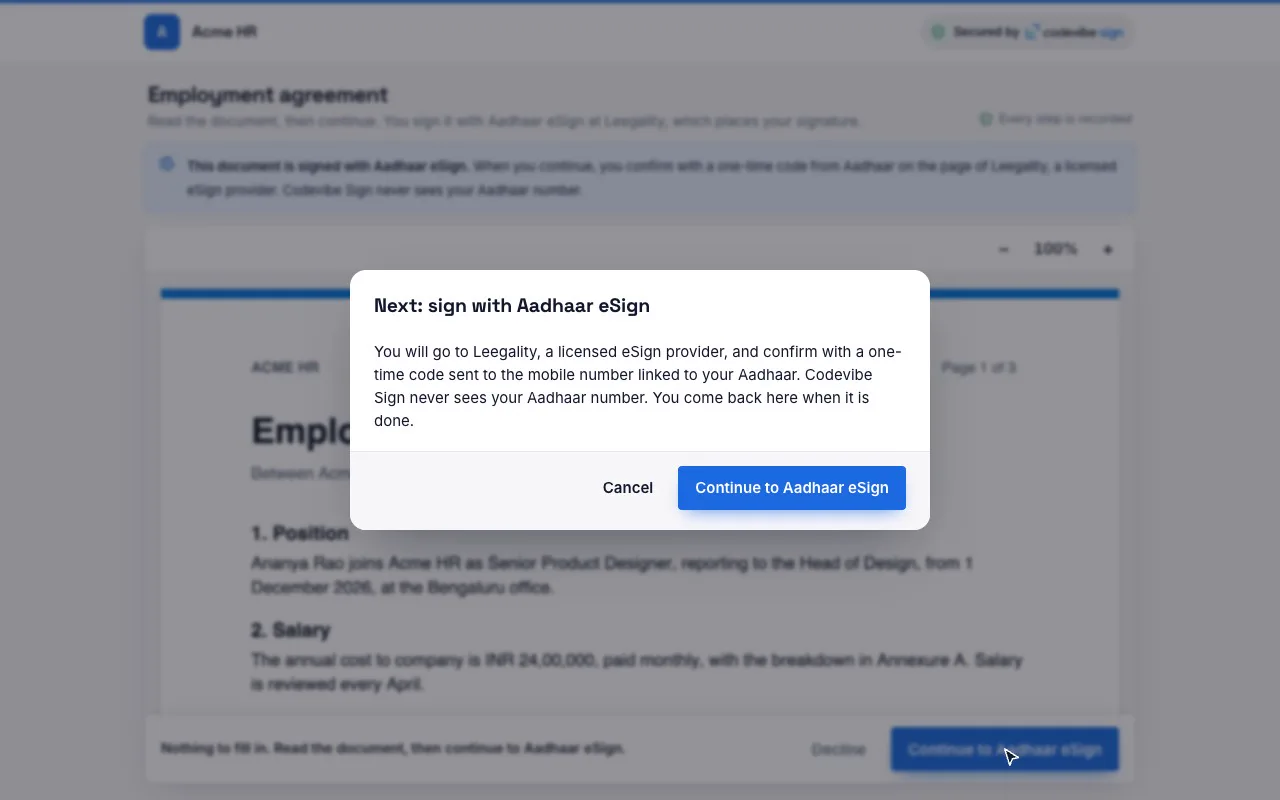
Aadhaar eSign lets a signer sign with an OTP from the mobile number linked to their Aadhaar, through Leegality, a licensed eSign provider. Use it where a law asks for a signature in the statutory sense; for most business documents the normal signature is enough. See Legal.
This page is for the people who set it up. For what the sender and the signer do, see Send a document and Aadhaar eSign with Leegality.
Who sets it up
Settings, Aadhaar eSign is open to owners and admins. The choice below belongs to the account holder, the owner whose plan the workspace is on, and applies to all the workspaces of their account. Everyone else sees it with Managed by and their name.
The top of the page says whether the workspace is ready to send with Aadhaar eSign. It shows Test mode while the install uses Leegality's sandbox: those eSigns are not legally valid.
Option 1: Codevibe Sign's account, with credits
The default on sign.codevibe.in, on every plan. Nothing to set up; you pay per completed eSign with prepaid credits.
- Price: one eSign costs one credit. The price of a credit is shown on this page, in the send flow and on the pricing section, before you pay, and is lower on Cloud than on Free. While it shows Price coming soon, nothing can be bought.
- Buying: Buy credits opens Settings, Billing, where the account holder or a billing admin buys a pack and pays by card, UPI or net banking. Every purchase gets a GST invoice.
- Spending: a credit is held when a signer starts the eSign and used only when it completes. If they decline, it fails or it runs out of time, the credit comes back.
- With no credits left, an envelope with an Aadhaar signer cannot be sent.
The full rules for holds, returns and invoices are in Credits and billing.
Option 2: your own Leegality account
On the Cloud plan (and on self-hosted installs) you can use your own Leegality account instead. Leegality then bills you directly and no credits are used. On Free the option shows See the Cloud plan.
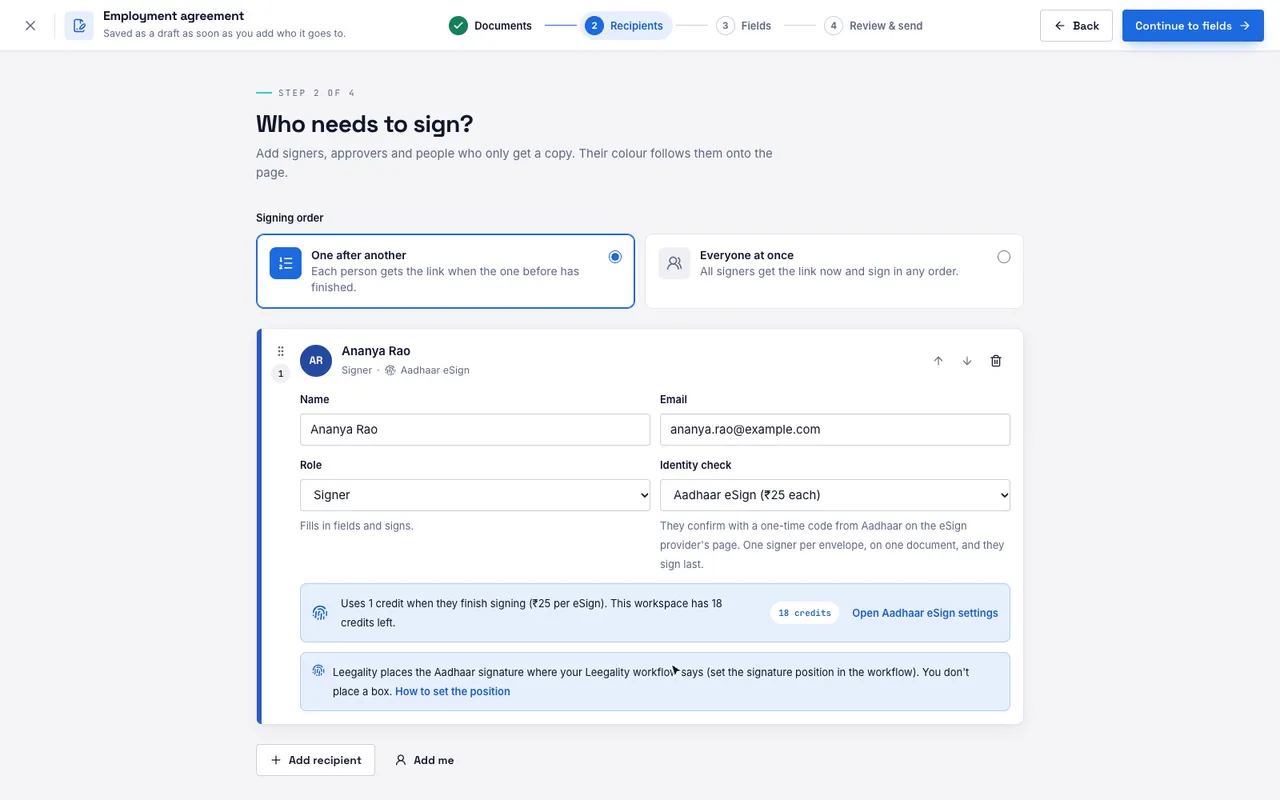
- In Leegality, publish a workflow with Aadhaar eSign as the signature type, and set the signature position for the invitee with custom coordinates. Leegality places the signature there when the sender places no box, and at the bottom left of every page when the workflow has none. See Set the signature position.
- Copy the Webhook and error webhook URL and the Redirect URL from this page into the workflow.
- Choose Use your own Leegality account and enter the Environment (Production or Sandbox), Auth Token (the dashboard may call it the legacy Auth Token), Private Salt and Workflow ID. Leave V4 workflow empty unless your account has V4 workflows and you want to use one.
- Press Check and save, then Test connection. The card says how the Aadhaar seal position reaches Leegality, for example "on, through Leegality's 2.1 API with your Auth Token (coordinates: points, bottom-left)". Nothing else needs setting up in Leegality: a request with a box goes through the 2.1 API with the same token, and asks for Aadhaar eSign, the webhook (version 2.5) and the redirect itself.
- Send one test eSign in the sandbox with the box over a known mark and check where the seal lands; see Calibrate the coordinates.
The details are encrypted and never shown again. If the account moves back to Free, the saved account is kept but not used until it is on Cloud again or switches to credits. The detailed steps are in Aadhaar eSign with Leegality.
What senders see
Aadhaar eSign follows Leegality's standard process. A signer who uses it fills in nothing. In Fields the sender may place one optional Aadhaar seal position, a box that only marks where Leegality draws the Aadhaar signature. Without it Leegality places the signature where the workflow says. A note in Recipients, Fields and Review says which applies. Leegality receives the document exactly as the sender approved it, with the fields of earlier signers filled in and nothing drawn for the box.
When it is signed, everyone gets two files:
- Signed document (Aadhaar eSign): the file Leegality signed, with the Codevibe Sign seal added as a second signature that changes no page. A PDF reader shows both signatures valid.
- Certificate and audit trail: one sealed PDF, named after the envelope, for example "Offer letter (certificate and audit trail).pdf", with the signing certificate (the signer's eSign certificate name and issuer, and the time of the signature) and every event.
The envelope page also offers Leegality audit trail, Leegality's own record, which goes with the completed email when it is small. If the name on the signer's eSign certificate is not the recipient's name, the envelope page says so. See What the parties receive.
Recent eSigns
Recent Aadhaar eSigns lists the latest 20, newest first, with how each one ended.