

Verify a sealed PDF
A sealed file can be checked by anyone who has it, without contacting the server that made it.
From the certificate page
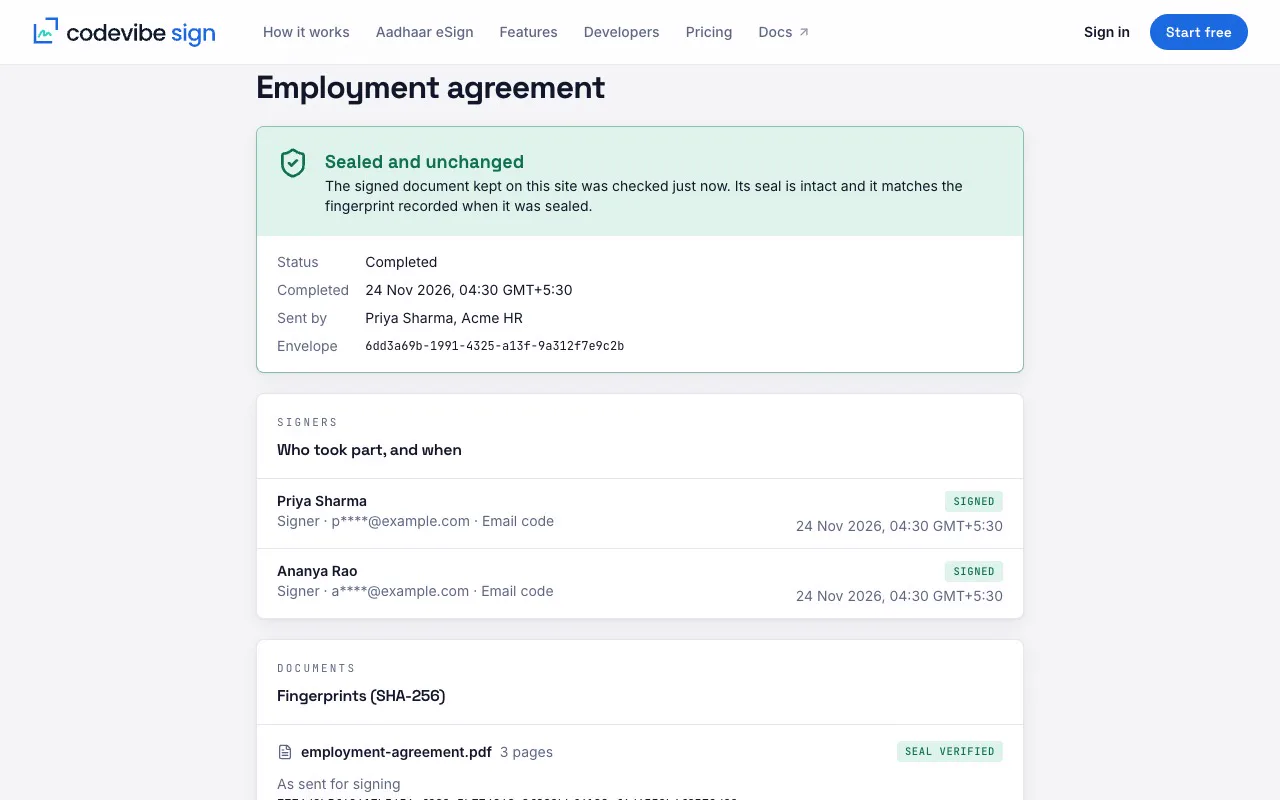
The last page of a sealed PDF is its signing certificate: the document, who sent it, who signed, how and when, and the document's SHA-256 fingerprint. It fits on one page for a usual envelope. Scan the QR code on it, or click the code in a PDF reader, to see the public record of that signing at /r/<record id> on the install that sealed it. The address itself is not printed. The record shows:
- whether the sealed file kept by the install still passes its seal check and matches the fingerprint recorded when it was sealed;
- the title, completion time and sender, and each signer with a partly hidden email address, the method and the time;
- the fingerprints of the document as sent and as sealed;
- the audit trail, with the result of the hash-chain check.
It never shows the document, IP addresses, browser details or one-time codes. The certificate and the audit trail can be downloaded from it as PDF, and the trail as JSON. The record id is a random 144-bit value, not the envelope id. Whoever sent the envelope can turn its record off from the envelope page, and a workspace can turn records off altogether in Settings > Workspace; the link then answers "not available" and new certificates carry no QR code.
A PDF reader that checks digital signatures also reports whether the file changed after sealing; see How the seal works in PDF readers.
On the verify page
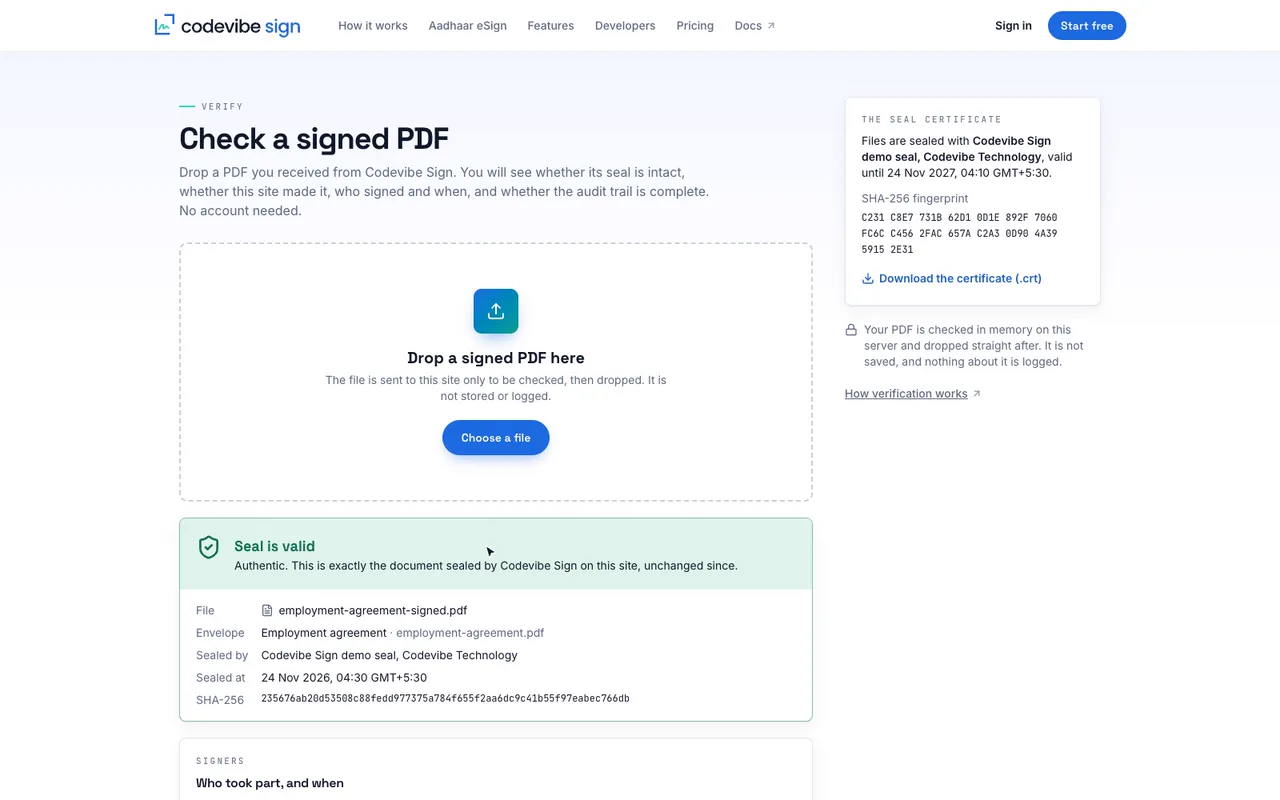
Anyone can check a sealed PDF on the public page at /verify of the install that sealed it, sign.codevibe.in/verify for the cloud. No account is needed: drop the file on Drop a signed PDF here or press Choose a file. Seal is valid means the seal is intact and was made by that install; the page then lists who took part and when, and the audit trail with whether its chain still matches. A file changed after sealing shows Not verified. The file is checked in memory on the server and not stored. Check the signed PDF itself, the one with the certificate as its last page.
With no file at hand, paste the record link under Open the record from the certificate page and press Open record. The page also shows the seal certificate's fingerprint, with Download the certificate (.crt), served at /verify/certificate.
To produce a sealed PDF as evidence in an Indian court, see Electronic evidence (section 63 BSA).
Over the HTTP API
The same check the verify page makes is a public route of the API, so your own product can offer it. No API key is needed. Upload the file:
curl -X POST https://sign.codevibe.in/api/v1/verify \
  -H "Content-Type: application/pdf" \
--data-binary @offer-signed.pdfimport { readFile } from 'node:fs/promises';
import { createVerifyClient } from '@codevibe_technology/sign-client';
const verify = createVerifyClient({ baseUrl: 'https://sign.codevibe.in/api' });
const result = await verify.pdf(await readFile('offer-signed.pdf'));
if (result.valid) {
console.log('Genuine:', result.envelope?.title, 'sealed at', result.signedAt);
} else {
console.log('Not genuine:', result.reason);
}Or ask by the file's SHA-256 without sending the file at all, with GET /v1/verify/{sha256}. The server then checks its own stored copy. A hash it never sealed answers valid: false with the reason unknown_document, and so does a file that was changed, because any change gives another hash.
The answer says which checks passed (sealed, singleSignature, intact, coversWholeDocument, trustedCertificate) and, for a valid file, the envelope id, the signers with masked contacts, each step with its time, and the head of the audit chain. That is what the certificate page inside the file prints, no more. Each client address may make 30 checks in 10 minutes and a file may be up to 20 MB; nothing about the file is stored. The verification reference has every field.
Use this when you trust the server you are asking. To check a file without contacting anyone, use the offline check below.
In code
verify from @codevibe_technology/sign-pdf checks the seal offline, against the operator certificate you trust. Keep that certificate (or its SHA-256) wherever you verify files. It is public, so you can ship it with your app or publish it.
import { readFile } from 'node:fs/promises';
import { verify } from '@codevibe_technology/sign-pdf';

const operatorCertificate = await readFile('seal-certificate.pem', 'utf8');
const result = await verify(new Uint8Array(await readFile('offer-signed.pdf')), {
  trust: { certificates: [operatorCertificate] },
});

if (result.valid) {
  console.log('Sealed by', result.signer?.commonName, 'at', result.signedAt, 'and unchanged');
} else {
  console.log('Not genuine:', result.reason);
}
valid is true only when the file has exactly one signature, the signature is intact, it covers every byte of the file, and it was made with a certificate in trust. reason says which check failed:
reason | Meaning |
|---|---|
not_sealed | The file has no signature field with a signature. |
multiple_signatures | More than one signature; the file was signed again after sealing. |
signature_invalid | The signature does not match the bytes it covers: the file was changed. |
not_whole_document | Bytes were appended after sealing (an incremental update). |
untrusted_signer | The seal is intact but made with a certificate you did not list in trust. |
trust takes certificates (PEM or DER), fingerprints (SHA-256 hex) or roots (a CA the operator certificate was issued by). After a key rotation, list the old certificate too so older files keep verifying.
The server runs the same check for each sealed document at GET /v1/envelopes/:id/documents/:docId/verification, and returns the hashes and the chain status at GET /v1/envelopes/:id/certificate and chainValid with every event at GET /v1/envelopes/:id/events.
verify and verifySeal
verifySeal(bytes) is the low-level check underneath. It reports whether the first signature is intact (valid), whether it covers the whole file (coversWholeDocument) and how many signatures there are, but not who made it: anyone can change a file and seal it again with their own key, and verifySeal will call that seal valid. Use verify to decide whether a file is genuine.
Checking the audit chain
The audit chain is verified with @codevibe_technology/sign-core. Take the envelope's events from your store or from GET /v1/envelopes/:id/events, and compare against the head printed on the certificate page:
import { verifyChain, webCryptoHasher } from '@codevibe_technology/sign-core';

const check = await verifyChain(events, webCryptoHasher, { expectedHead: headFromCertificate });

if (check.valid) {
  console.log('Audit chain intact, head', check.head);
} else {
  console.log(`Chain broken at event ${check.brokenAt} (${check.reason})`);
}
If both the seal and the chain check out, the file is the one that was sealed and the recorded history is the one that produced it.