

Bulk send
Bulk send makes one envelope for each row of a CSV file, all from the same template. Use it for a policy everyone signs, or offer letters for a batch.
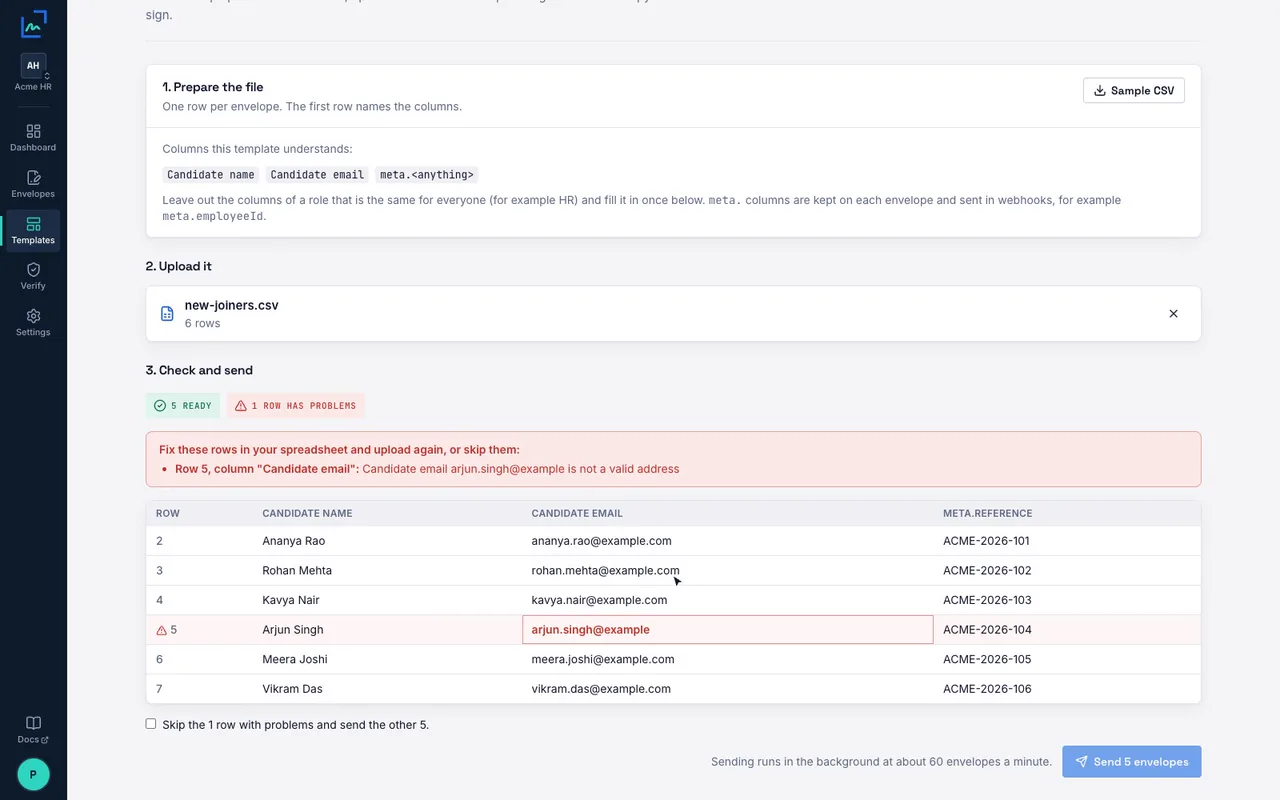
1. Prepare the file
On the template press Bulk send, then download the Sample CSV. It has the columns the template needs:
| Column | What goes in it |
|---|---|
<Role> name | The person's name, for example Employee name. |
<Role> email | Their email. |
meta.<anything> | Your own reference, kept with the envelope. |
A role with no columns gets the same person on every envelope; the page shows it as Same for every envelope and asks for that person once. Pre-filling field values from the file is not available yet; a file with such columns is refused with a message saying so.
2. Upload it
Upload the file and check the summary. A file can have up to 500 rows and 1 MB. On the Free plan a bulk send has at most 10 rows, and every row counts towards the 10 envelopes a month, so the app refuses a file that has more rows than you have envelopes left this month.
Follow it
Envelopes go out at about 60 a minute. The progress page shows each row; the Not sent filter lists the rows that failed and why. Stop sending stops the rest: envelopes already sent stay sent.
Each envelope is an ordinary envelope under Envelopes, with its own reminders and expiry.