

Workspaces and addresses
A workspace holds envelopes, templates, people, brand, API keys and webhooks. Most teams need one; agencies or groups of companies keep one per client or company.
Create a workspace
Your first workspace is made right after your first sign-in, under Create your workspace: a Workspace name (up to 80 characters) and its address. For another one, open the workspace menu at the top of the sidebar and choose + New workspace.
On the cloud, workspaces belong to your account. The Free plan holds one; Cloud holds as many as you need under one subscription. See Plans and pricing.
An install run with SINGLE_WORKSPACE=true has one workspace, and people join it by invitation only.
Switch between workspaces
The workspace menu lists every workspace you are in. Each one lives at its own address, /dashboard/<address>, so you can bookmark it or keep two open in separate tabs.
The workspace address
The address is the part after /dashboard/. It is suggested from the name, including names written in Indian scripts, and must:
- be 3 to 40 characters of lower-case letters, numbers and single hyphens;
- not start or end with a hyphen;
- not be a reserved word such as
api,admin,settingsorverify.
If it is taken, the app suggests one that is free.
Change it
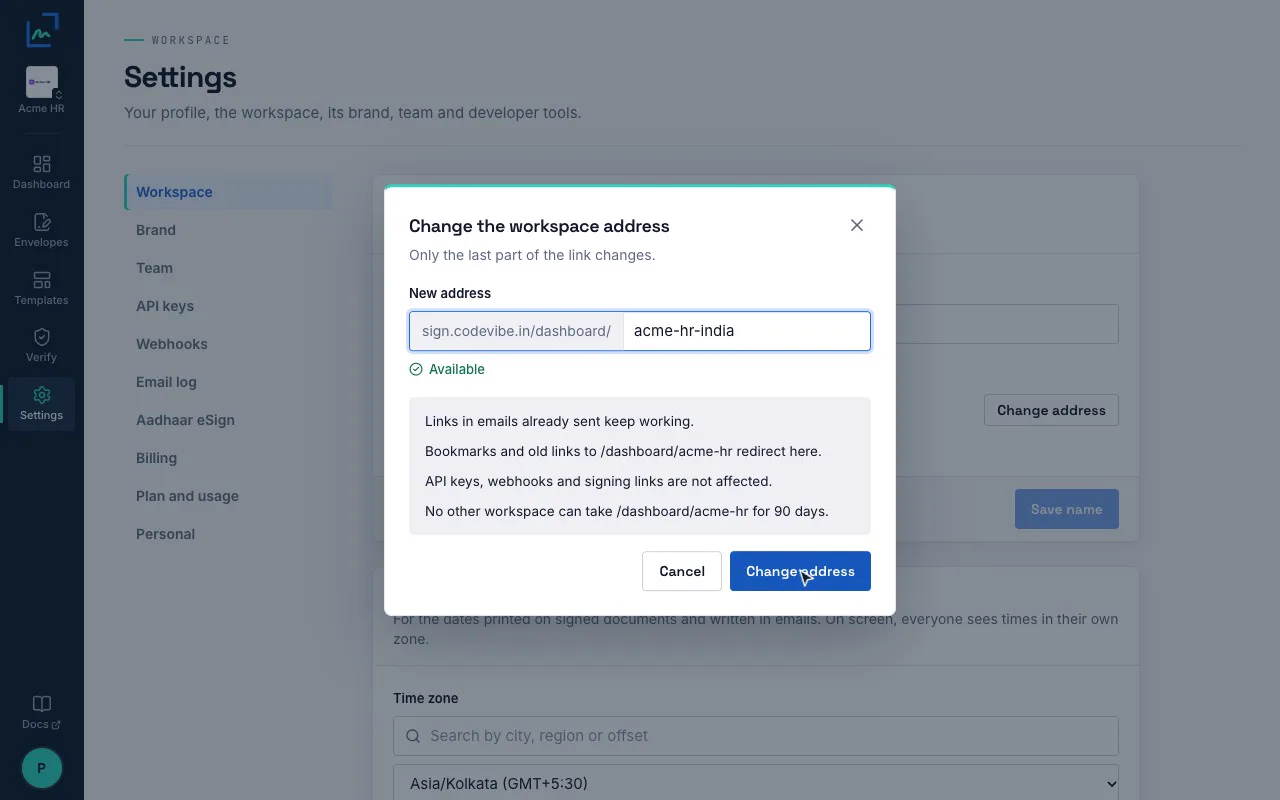
Owners and admins open Settings, Workspace and press Change address. In Change the workspace address, type the New address; it shows Available once it is free. Press Change address.
- Links in emails already sent keep working.
- Old
/dashboard/<old address>links lead to the new one. The workspace settings list them under the address, for example "Old address that still leads here: /dashboard/acme-hr". - API keys, webhooks and signing links are not affected; they use the workspace's id.
- No other workspace can take the old address for 90 days.
- An address can be changed 5 times in 30 days.
Name and time zone
Under Settings, Workspace, change the name with Save name. Time zone sets the zone used for dates printed on documents ("date signed" fields, the line under each signature, the certificate) and in emails. The certificate always shows UTC as well. A new workspace starts with the install's default zone.
Public records
Give completed documents a public record is on for every new workspace. With it on, the certificate page of each sealed document carries a QR code that opens a public page with the seal status, the signers (with emails and phone numbers partly hidden) and the audit trail. It never shows the document. Turn it off here for the whole workspace, or for one envelope on its page. See Verify a sealed PDF.
Delete a workspace
There is no button for this yet. On sign.codevibe.in, write to hello@codevibe.in from the owner's address. To hand a workspace to someone else instead, transfer it.