

Plans and pricing
Codevibe Sign runs in three ways. Every one of them seals documents the same way and keeps the same audit trail; the plans differ in limits and in who runs the server.
| Free | Cloud | Self-hosted | |
|---|---|---|---|
| Workspaces | 1 workspace | Unlimited workspaces, one subscription | Unlimited |
| Envelopes sent | 10 envelopes a month | Unlimited | Unlimited |
| Members | 2 members across your workspaces | 25 members included across your workspaces, more can be added | Unlimited |
| Active templates | 2 templates across your workspaces | Unlimited | Unlimited |
| Bulk send | Up to 10 rows in one send | Up to 500 rows in one send (fair use) | Unlimited |
| API requests | 100 requests a month across your workspaces | Unlimited, up to 10,000 requests a day (fair use) | Unlimited |
| Webhooks | Not included | Up to 10 endpoints (fair use) | Included |
| PDF size | 10 MB a file, 25 MB an envelope | 25 MB a file, 100 MB an envelope | Set by you |
| Stored documents | 200 MB | 20 GB (fair use) | Your own disk |
| Your own signing domain | Not included | Included | Included |
| "Secured by Codevibe Sign" badge | Always shown | Optional | Optional |
| Aadhaar eSign | Pay per eSign with prepaid credits | Pay per eSign with prepaid credits, at a lower price | With your own eSign provider account |
| Connect your own eSign provider account | Not included | Included | Included |
"Fair use" marks a ceiling that is not part of what the plan sells. It is there so that one workspace cannot slow the service down for the others. Write to us if you reach one.
Free
A workspace on sign.codevibe.in at no charge, with no card needed. When a limit is reached, the app says which one and how much of it is used. Nothing already sent is affected: people can still sign and every sealed copy stays downloadable.
- 10 envelopes a month. An envelope is one signing request, however many PDFs and signers it has. It counts once, when it is sent: from the app, from a template, in a bulk send or over the API. Drafts do not count, and neither does the sample envelope on the dashboard. Voiding an envelope later does not give its place back, and a recalled or revised envelope counts again when it is sent again.
- The count is for your account, across all its workspaces, and starts again on the 1st of each month (UTC). The Plan and usage page shows how many are left and the day it starts again.
- A bulk send with more rows than you have envelopes left this month is refused before anything is sent.
- The API request count starts again on the 1st of each month in India time. Every request made with an API key counts, including one that ends in an error. Past the count the API answers
429with the codePLAN_LIMIT, aRetry-Afterheader and the time the count starts again.
Accounts and workspaces
A plan belongs to your account, not to one workspace. Your account holds every workspace you create, and one subscription, one set of billing details and one wallet of eSign credits cover all of them.
- Free includes one workspace. Cloud has as many as you need under one subscription.
- Limits are counted across your workspaces together: members, active templates, envelopes a month, API requests and stored documents.
- A person who is in several of your workspaces counts as one member.
- Being invited into someone else's workspace is always possible. It takes a place on their account, not on yours.
- You, the account owner, can change the plan, pay, see invoices and set up Aadhaar eSign. You can also make someone a Billing admin, who can do the same billing tasks without managing the team or settings. Admins of your workspaces can see the plan and usage, but not invoices.
- A workspace stays on the account of the person who created it, and they stay an owner of it.
If you already had more than one Free workspace when this changed, you keep all of them and everything in them. You cannot create another until you move to Cloud, and the Free limits now apply to your workspaces together.
Cloud
| What | Price |
|---|---|
| Your account, one month | Rs 999 |
| Your account, one year | Rs 9,990 (ten months, two are free) |
| Each member beyond the 25 | Rs 99 a month |
Prices do not include GST at 18%. Every payment gets a GST tax invoice from Codevibe Technology Private Limited by email, and all invoices are listed under Settings, Billing.
How paying works
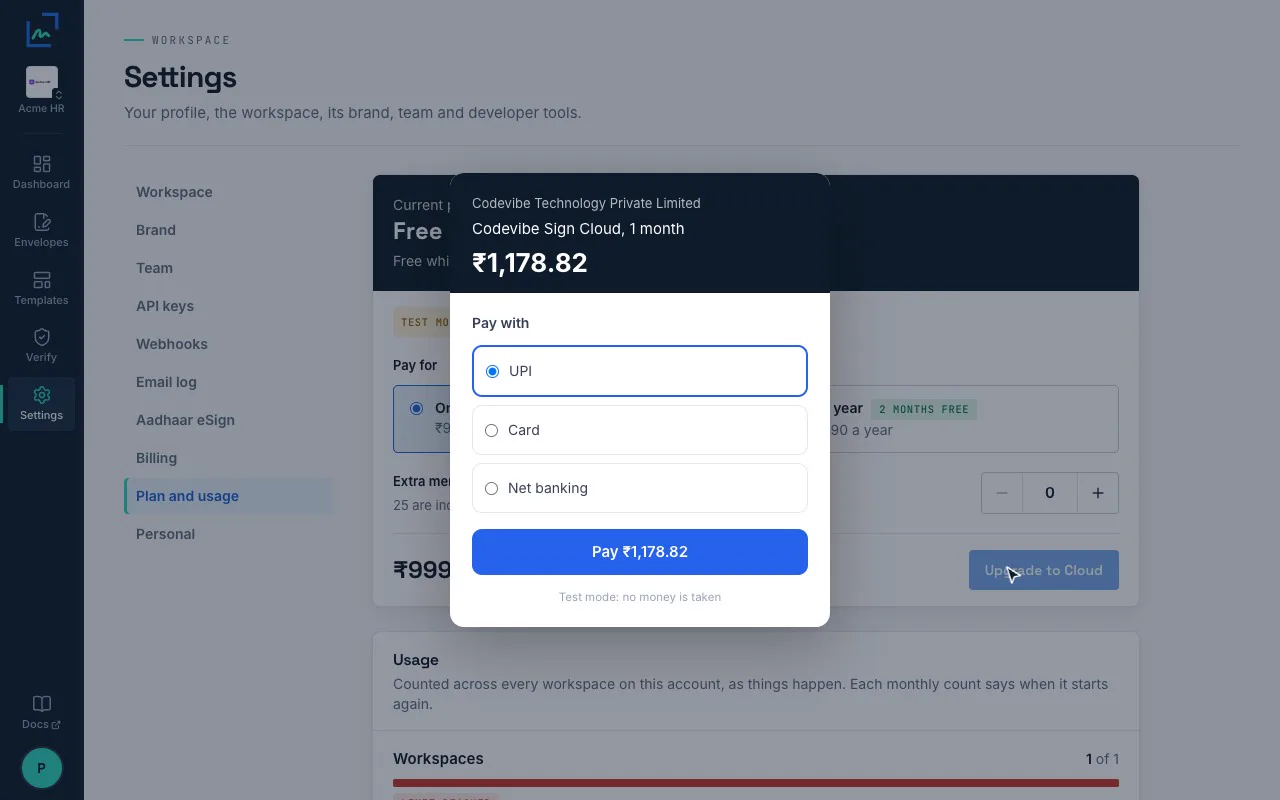
- The account owner, or a billing admin, upgrades from Settings, Plan and usage, in any of the account's workspaces. Add your billing details under Settings, Billing first; they are printed on the invoice. Under Pay for, choose One month or One year, add extra members if you need them, then press Upgrade to Cloud and pay. Cloud starts as soon as the payment is confirmed: the page then shows how long the account is paid up to.
- You pay for each term up front by card, UPI or net banking. Nothing is charged automatically and there is no payment mandate.
- The next term can be paid in the last 7 days of the current one. It always starts where the paid term ends, so paying early does not lose you any days.
- We email a reminder 7, 3 and 1 days before a term ends.
Extra members
Members beyond the included 25 can be added at any time. In the middle of a term you pay for the days that are left: the price of a member for the term, times the days left, over the days in the term, rounded to the nearest paisa. They can be invited as soon as the payment is confirmed, and the next term includes them. To have fewer, set the number for the next term on the same page; the current term keeps what was paid for.
If a term is not renewed
Your workspaces stay on Cloud for 7 more days. If the term is paid in that time, it continues from the day the last one ended. After that the account moves to the Free plan:
- Nothing is deleted. Documents, templates, members and envelopes in progress all stay.
- The Free limits apply to anything new. An account that is over a Free limit keeps what it has, in every workspace, but cannot add more until it is under the limit. That includes workspaces: you keep them all and cannot create another.
- Webhooks are paused, and a connected eSign provider account is not used.
- eSign credits you have stay on the account and can still be used. Credits bought while on Free are at the Free price.
- Moving back to Cloud restores everything as it was.
Cancelling
Cancel at any time from the same page. Cloud stays on until the end of the term you paid for, then the account moves to the Free plan as above. The term already paid for is not refunded. You can undo the cancellation any time before the term ends.
Aadhaar eSign
A signer can be asked to sign with Aadhaar eSign. On the cloud this is paid per completed eSign with prepaid credits, bought in packs from Settings, Billing.
- The price of one eSign is shown on the pricing section and in the app before you buy. It is lower on Cloud than on Free.
- A credit is held when a signer starts and used only when the eSign completes. One that is declined, fails or runs out of time costs nothing.
- Credits do not expire, and they stay usable if the account moves to Free. Credits bought while on Free are at the Free price.
- On Cloud you can connect your own Leegality account instead, once for all your workspaces; Leegality then bills you directly and no credits are used.
See Aadhaar eSign with Leegality and Credits and billing.
Self-hosted
The same app on your own server, free and without limits, under the open-source licences. See Self-host with Docker. A self-hosted install has no plans and no billing pages, and uses your own eSign provider account for Aadhaar eSign. No invoice is ever issued in Codevibe's name by a self-hosted install.
Installation help
If you would rather not set it up yourself, an experienced engineer installs Codevibe Sign on your server within 4 working hours of getting access: Rs 1,999 plus GST, paid online, with a GST tax invoice. See Installation help and hosting.
A server to run it on
Need a server? Our VPS hosting partners give an extra 20% discount through our links, listed on the pricing section and the installation help page.